

Grant invoices
When supplier invoices are used as payment of awarded grants
What is a grant invoice?
A grant invoice is a supplier invoice that is used for payment of an awarded grant. Instead of the recipient of the grant getting money paid out to their account, they are allowed to send an invoice to the foundation, which the foundation pays on the recipient’s behalf. In practice the invoice is usually sent directly from the supplier to the foundation.
Examples of this type of invoice are dentist invoices, glasses invoices and hotel stays
What differs in the handling of a grant invoice and a supplier invoice in Kleer is that on a grant invoice you must state which grant or grants the invoice concerns. Otherwise everything is the same.
The same settings for authorisation chains and segregation of duties apply to these invoices too.
The grant invoice flow as a whole
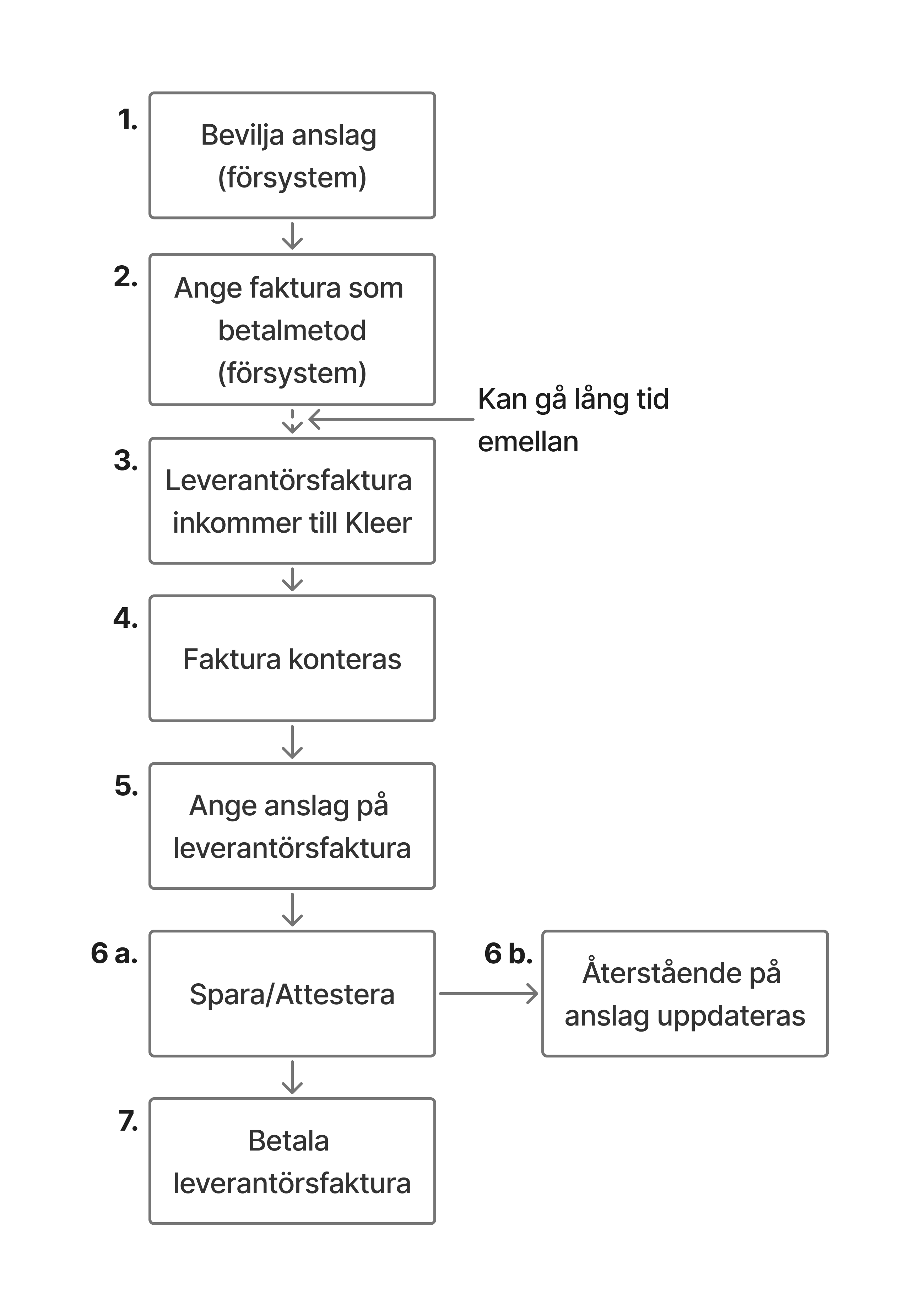
1. Award the grant (source system)
All grants that are handled in Kleer must first be awarded. This is done in the source system you have chosen. Common source systems are Stiftelserummet (Boardeaser) and SBS.
2. State invoice as the payment method (source system)
For it to be possible to match a supplier invoice against the grant, it must have been marked in the source system as to be paid by invoice. For how this is done in practice in the source system, we refer you to the guides of each source system.
3. Supplier invoice arrives in Kleer
Grant invoices are to be sent to Kleer like other supplier invoices. That is, by email, EDI or post. Please mark, or ask the supplier to mark if possible, that it concerns a grant.
4. Invoice is coded
When the invoice has arrived, it is coded by Kleer’s staff. It is booked against the liability account for grants.
5. State the grant on the supplier invoice
Users at the foundation with permission to administer supplier invoices state on the supplier invoice which grant the invoice concerns. This is done in the Allocation section, where the available grants are shown in a drop-down list that you can search. The invoice can be split over several grants, with an amount of its own for each grant. See Handling grant invoices in Kleer.
6 a. Save/Authorise supplier invoice
When a grant has been chosen on the invoice, it must be saved, or authorised if the choice of grant is made by the authoriser. The invoice can be saved even if the whole amount has not yet been distributed on grants, but it cannot be authorised until the whole amount is distributed.
6 b. Remaining amount on the grant is updated
When a grant is chosen on the invoice, the remaining amount on each chosen grant is updated so that it is not overdrawn by mistake.
7. Pay supplier invoice
Pay the invoice just like other supplier invoices
Handling grant invoices in Kleer
Inside a supplier invoice, the Allocation section is shown below the coding when the invoice is booked against the liability account for grants. The section is there in both the simplified invoice view and the full one.
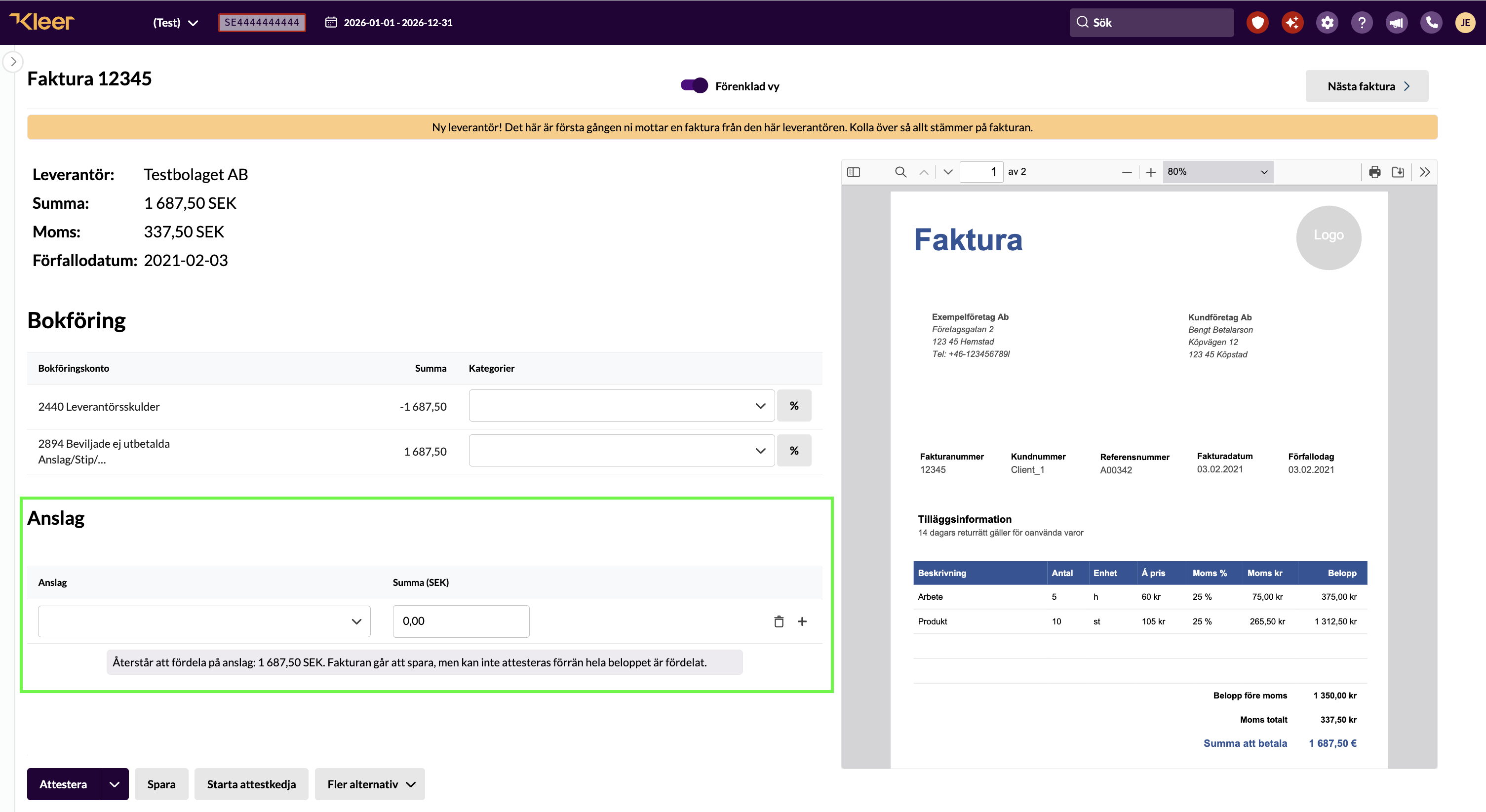
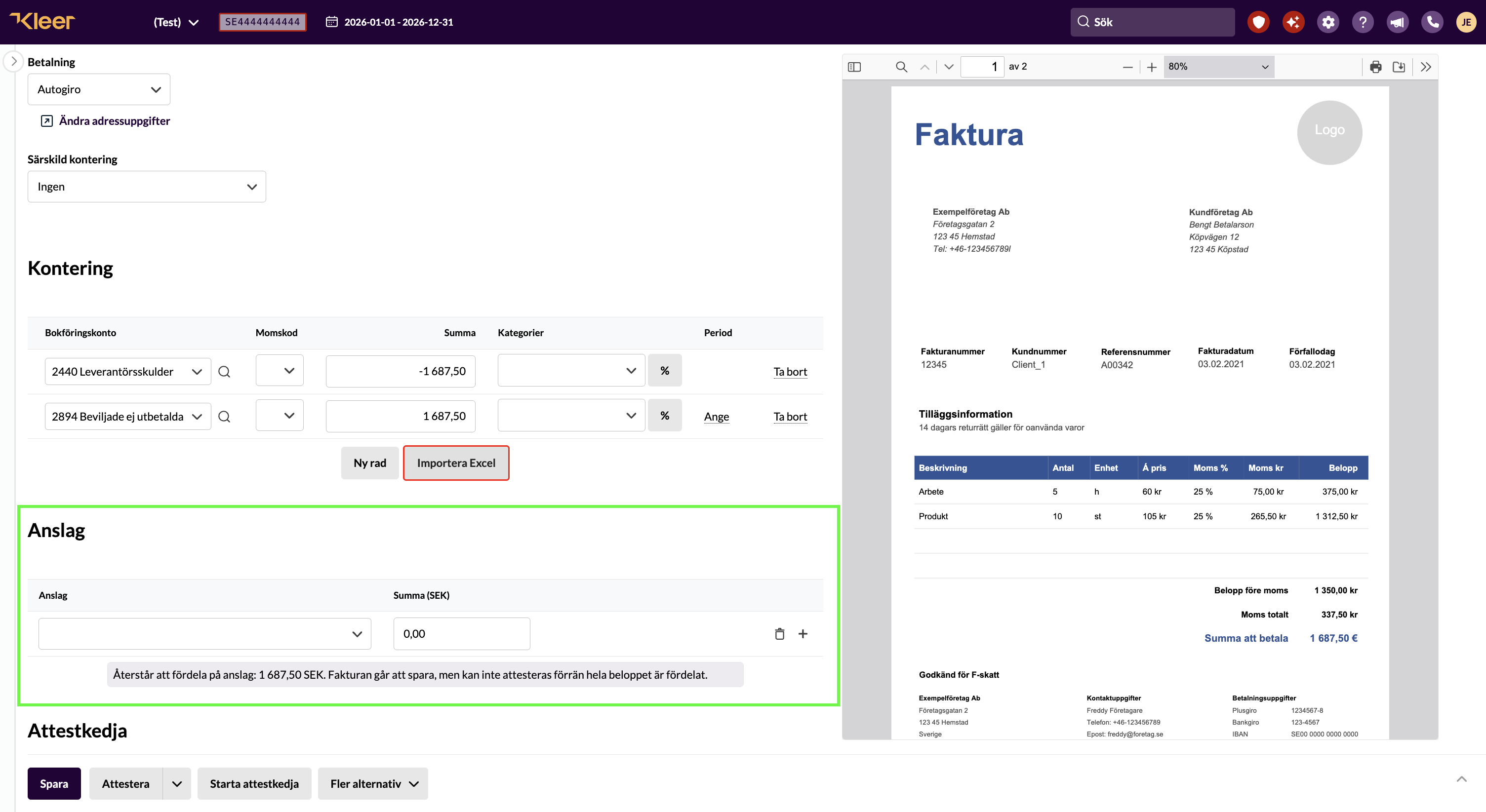
How to distribute the invoice on grants:
- Choose a grant in the drop-down list on the first row. You can search the list.
- The Total field is filled in automatically with what is left to distribute, but never more than what remains on the chosen grant. If the invoice concerns only one grant, you usually do not need to change anything.
- If the invoice is to be split over several grants, change the amount on the row and click the plus sign to add a new row. Choose the next grant and enter its amount.
- Remove a row with the bin icon.
Below the rows you can see how much is left to distribute on grants. The invoice can be saved before the whole amount is distributed, but it cannot be authorised until the sum of the grant rows equals the invoice amount on the liability account for grants. If you have distributed too much, the message instead shows how much the distribution exceeds the invoice amount.
FAQ
Why can't I see the Allocation section on an invoice in Kleer?
For the function of matching a supplier invoice against a grant to work in Kleer, the invoice must be booked against the liability account that is used for grants. The default account for that is 2894, but you can also use another account. If you have permission to change the accounting account in the coding of the invoice, you can do so, and the section will then be shown. If you feel unsure, contact Kleer and we will help.
Why can't I see the grant in the drop-down list on an invoice?
There are two main reasons for this
- Kleer has not received information from the source system that the grant is to be paid by invoice. Check in the source system that this has been stated and that it has been synchronised to Kleer.
- There is no amount left on the grant. A grant that is already fully distributed on other invoices is not shown in the list.
A grant that has been chosen on another row of the same invoice is not shown again either.
If you have checked this and the grant still does not appear, contact Kleer.
What do I do if the grant does not cover the whole invoice?
Split the invoice over several grants, with an amount for each grant, if there are more grants the invoice can be charged to. If the grants still do not cover it, either a higher amount needs to be awarded in the source system, or the excess amount can be taken as another type of cost. In that case, contact Kleer and tell us how the cost should be taken, and we will update the coding.
Why can't I authorise the invoice?
A grant invoice can only be authorised when the whole invoice amount on the liability account for grants is distributed on grants, no more and no less. Below the grant rows you can see how much is left to distribute, or how much too much has been distributed. Adjust the amounts on the rows until the message disappears.
Can I state a grant on a credit invoice?
No. Grants can only be stated when the invoice books a positive amount on the liability account for grants. On a credit, remove the grant match on the original invoice instead. That is possible even after it has been authorised and paid.