

Voucher proposals
How you propose vouchers that Kleer's consultants authorise, and how you copy or reverse an existing proposal.
Propose bookings to your consultant team when needed.
In Kleer we have a function called “Voucher proposals”, made to help customers who sometimes need to create bookkeeping that is not directly linked to, for example, invoices, receipts or salaries.
Because the bookkeeping in Kleer is as a rule automated, manual vouchers are usually handled by our consultants. This is to make sure everything is booked correctly and that no system accounts are used wrongly. But for some customers with special needs, we offer the option to propose vouchers yourselves, which are then reviewed and authorised by our consultants.
When is the function suitable?
If you feel a need to create manual bookings, please contact your consultant team. Together we go through your needs and decide whether the bookings need to be handled manually, or whether they can be automated for a smoother and more sustainable way of working. In most cases an automated flow is preferable, both for efficiency and to reduce the risk of errors.
Copy a proposal
If you make the same kind of booking repeatedly, for example a transfer entry that looks the same every month, you do not need to fill in all the account coding lines from scratch each time. Start instead from a proposal you have already created, change what differs and submit it. It is faster and reduces the risk of a line being wrong.
Go to Accounting > Import bookkeeping voucher and open the proposal you want to start from. The Copy button is in the button row at the bottom of the dialog. Click the button itself for an ordinary copy, or the arrow next to it for the other choices.
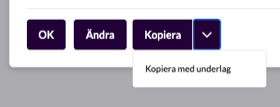
| Choice | Use when |
|---|---|
| Copy | You are going to make a similar booking again, but have a new supporting document for it. |
| Copy with attachment | The same supporting document also applies to the new booking. |
| Copy and turn around | You are going to reverse an authorised booking, see Copy and turn around. |
Copy and turn around is only available for authorised proposals. On a deleted proposal the Copy button is not shown at all.
What comes with the copy
- All account coding lines, with account, VAT code, categories, organisation number and amount.
- Description and notes.
- The supporting document, but only if you choose Copy with attachment. An ordinary copy gets no attachments.
The date is set to today’s date, not to the original’s.
The copy opens in the same dialog as when you create a new proposal, so you can change it before you save. When you save, a new proposal is created under the filter Open, and your contact person at Kleer gets a notification just as when you create a proposal from scratch. The original is not changed. If you close the dialog without saving, nothing is created.
Copy and turn around
You can now reverse your own vouchers directly from the authorised proposal. You no longer need to fill in the proposal’s fields again: all fields come up pre-filled for a correct reversal, so the only thing left is to check and save.
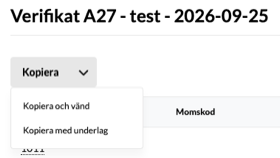
This is what the reversal looks like:
- All amounts get the opposite sign, so debit becomes credit and the other way round.
- Categories, VAT code and organisation number are kept unchanged.
- The description becomes “Reversal of” followed by the original’s description. If it gets too long for the field, it is shortened.
- The supporting document does not come along.
- The date is set to today’s date.
The reversal is saved as a new open proposal that your consultant authorises, just like an ordinary copy.
You can always see which proposals belong together. Under History in the dialog, the reversal shows “Created as reversal of” and the original shows “Copied and reversed in”, both with a link to the other proposal. The link remains even after the reversal has been authorised.