

Factoring via Lendify
How to sell customer invoices to Lendify directly from Kleer: how to apply and get started, what happens to the invoice and how the repayment to Lendify happens automatically when the customer has paid.
Factoring (invoice purchase) means that you sell your customer invoices to a finance company, in this case Lendify, and get paid straight away instead of waiting for the customer to pay. The integration is with recourse, which means that you are responsible for the customer paying the original invoice and then repaying the amount of the financed invoice to Lendify.
How to get started
You pay no fixed fees, only when you choose to use the service. The fee is regulated in your agreement with Lendify, and Kleer customers get a special offer. Contact your consultant if you want to know more, or apply directly with Lendify.
Activation
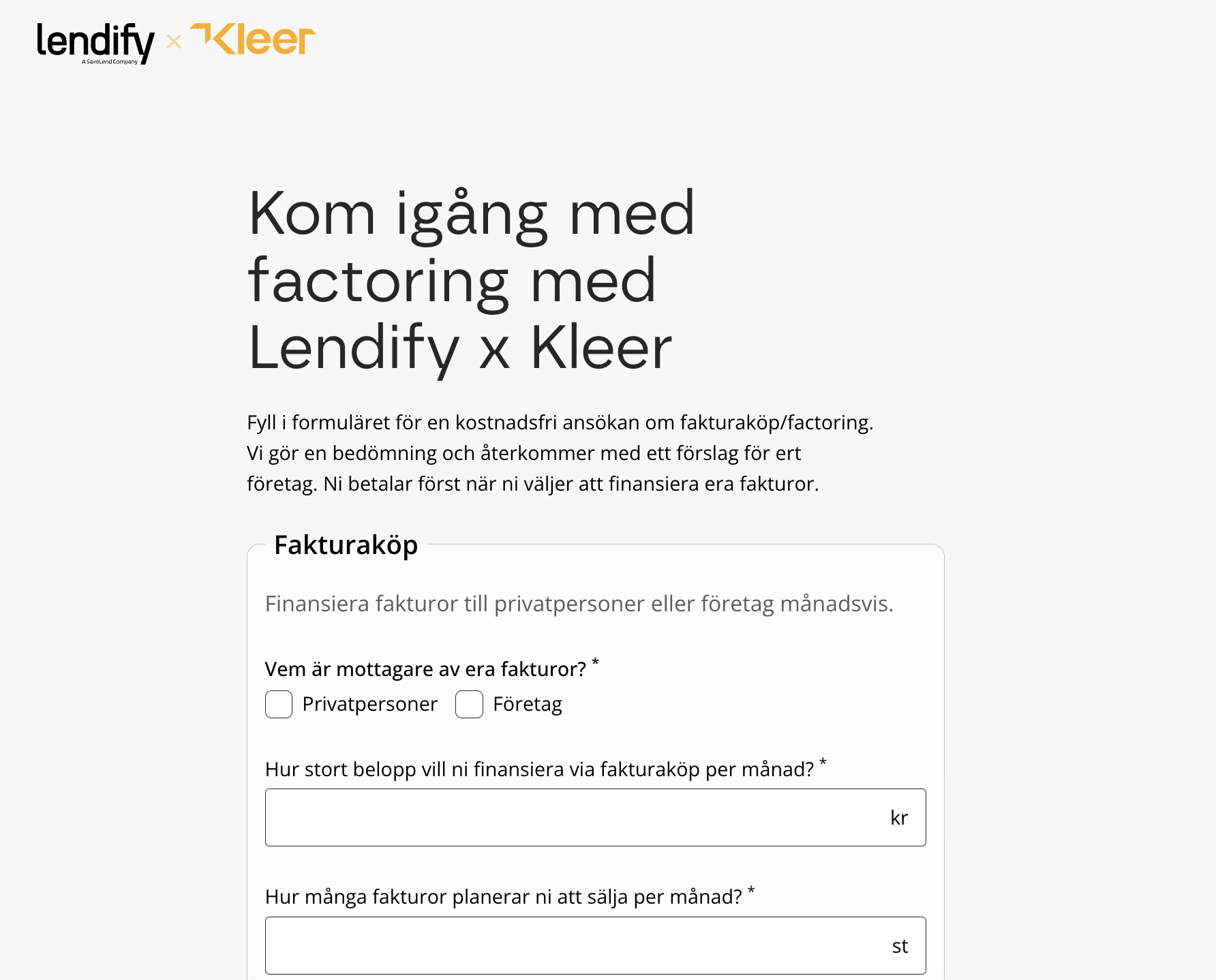
You apply for the factoring integration with Lendify in Lendify’s application form: lendify.com/ansokan/foretagsfinansiering-kleer.
You then go through the process at Lendify to be approved to use the service, and sign the agreement with BankID.
When this is completed, Lendify sends a confirmation and an IssuerID to Kleer’s technical support, who verify that the integration is ready to start. Kleer then sets up the Lendify integration for your company. You do not need to do anything yourself in Kleer for that step.
When the integration has been activated you are informed, and the Certify with factoring button appears when you authorise customer invoices.
Permission
To see the Certify with factoring button, the user needs the role Factoring, which is found in the category Payment manager among the permissions. The role can only be assigned once the Lendify integration is active.
The flow step by step
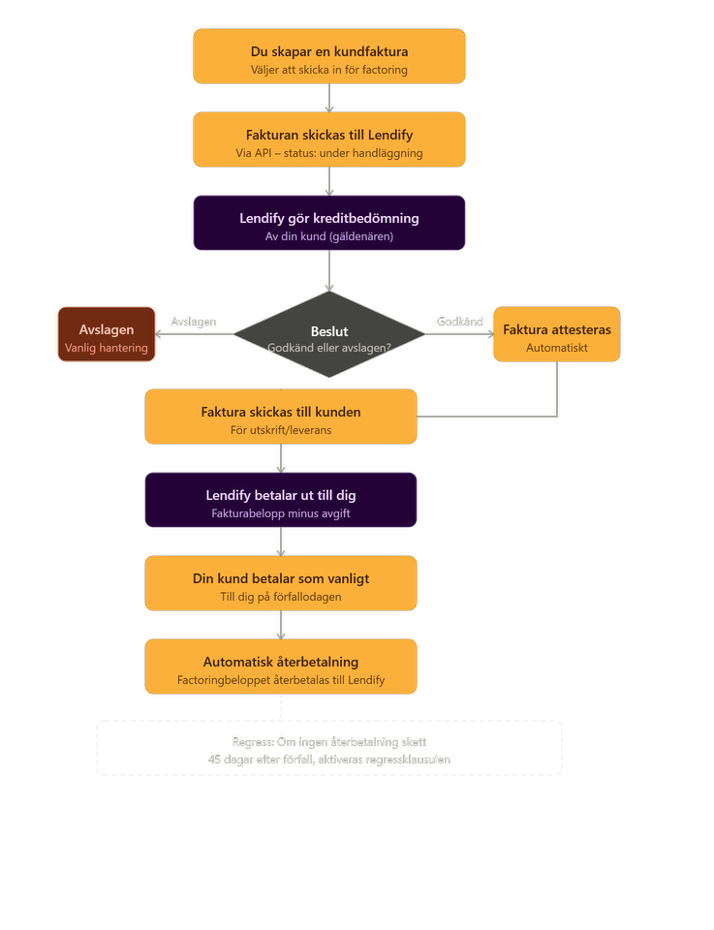
- You create a customer invoice. You create the invoice as usual. Instead of authorising it in the usual way, you click Certify with factoring, either in the button row at the bottom of the invoice or, for selected invoices, in the authorisation list, and confirm that you want to sell the invoice.
- The invoice is sent to Lendify. The invoice, including the PDF, is sent automatically to Lendify. Lendify gets information about the invoice amount, the due date and your customer’s organisation number. The invoice now enters the state of being processed.
- Lendify makes a credit assessment. Lendify assesses the creditworthiness of your customer (the debtor). So it is not you who is assessed, but the customer you have invoiced. The assessment is made at Lendify and is outside Kleer’s control.
- Decision: approved or rejected.
- Approved. Lendify notifies Kleer, and the invoice is authorised automatically and sent to the customer.
- Rejected. Lendify refuses the invoice based on the credit assessment. The invoice can then be handled in the usual way instead.
- Lendify pays out to you. On approval, Lendify pays out the invoice amount minus a factoring fee directly to your bank account. So you get the money without having to wait for the customer.
- Your customer pays as usual. The customer pays the invoice to you on the due date. Kleer registers the payment against the factoring case.
- Automatic repayment to Lendify. When the customer has paid the original invoice, a repayment of the financed amount to Lendify is created automatically.
Before you send an invoice
Kleer checks a few details before the invoice can be sent to Lendify:
- The customer must have a name and organisation number on the customer card.
- A postal town must exist, either on the invoice or on the customer card.
- The invoice amount must be greater than zero.
- The invoice must not be issued in a period that is locked for accounting.
- The invoice must not already be authorised.
If anything is missing, you get a message about what needs to be completed.
While Lendify is processing the invoice
As long as Lendify has not replied, the message The invoice has been sent to Lendify and is awaiting a reply is shown at the top of the invoice, and the invoice cannot be changed, authorised or removed. In the authorisation list the row is marked with Lendify’s icon.
If the invoice is approved, it is authorised and sent to the customer automatically. If it is rejected, it stays in the authorisation list with a message that the financing was rejected, and you can then authorise and send it as usual.
After approval
The text on the invoice
A sold invoice gets an assignment notice at the top of the footer on the first page:
This receivable has been assigned to SBL Finans AB (publ) (Reg. no. 556933-0961) in connection with a financing arrangement. Payment with discharging effect must nevertheless be made directly to the issuer (supplier) of the invoice, who receives payment as agent for SBL Finans AB (publ). For questions, please refer to the issuer’s contact details in the footer
The invoice keeps your own bankgiro and your own payment details, because the customer pays you.
Status in the invoice lists
The status column in the customer invoice lists shows Factoring via Lendify while the invoice is being processed and as long as the factoring is active. The status and the icon stay until the repayment to Lendify has been booked, even if the customer has already paid the invoice.
To see which invoices are sold to Lendify on a given date, use the report Accounts receivable ledger factoring, described in Customer reports, Accounts receivable.
The repayment
The repayment is created when the invoice is fully paid, whether the payment was matched from the bank, registered manually or reconciled. A partial payment does not start a repayment. When the rest is paid, the whole invoice amount is repaid.
The repayment goes as a bankgiro transfer to Lendify from one of the company’s bank accounts. The account needs to have automatic transfers activated. The repayment applies to invoices in Swedish kronor.
When the bank has confirmed the transfer, the factoring is closed automatically and the status disappears from the lists.
Accounting
When Kleer sets up the integration, the accounts 2811 Liability to factoring company and 6572 Factoring fees are created in the company’s latest financial year.
The payout from Lendify is booked by the bank rule Factoring, which recognises payments from Lendify from the transaction’s reference and books them against account 1682. The rule is added on the bank account under the Rules tab with New rule.
Important things to know
- With recourse. You keep the responsibility for the customer paying. Recourse is only activated, however, if 45 days have passed after the due date without the factoring amount having been repaid.
- Fee. Lendify charges a fee that is deducted from the payout. The size is decided at approval.
- Credit assessment. It is your customer’s creditworthiness that decides whether the invoice is approved, not yours.
- Automatic authorisation. On approval the invoice is authorised automatically, and you do not need to do anything more.
- One invoice at a time. Each invoice is handled as a separate factoring case with its own tracking ID, even when you send several from the authorisation list.
The flow is made to be as automatic as possible: you create the invoice and send it in, and Kleer handles the communication with Lendify until you get the payout and the repayment has been made.
Terminate
The integration is set up by Kleer and also disconnected by Kleer. Contact your consultant or Kleer’s support.