

Reminders and claims management in Kleer
Here you can read more about automatic flows for reminders and claims management, and how reminders and claims actually work in Kleer and through Billecta
Send reminders on unpaid customer invoices, or send them for debt collection and claims management through Billecta
Reminder handling in Kleer
From Kleer you can send reminders on unpaid customer invoices, and also pass them on for debt collection and claims management through Billecta. To keep track of which customer invoices are unpaid, there are a number of views you can look at more closely. First the invoice overview, where you can search for specific invoices and see all the customer invoices you have sent. There is also a heading for reminders, where you see the invoices that are unpaid and could be relevant for reminder handling. You can also go to the heading claims management, where you have a similar view, but where you can instead pass invoices on for the debt collection and claims management that is carried out by our partner Billecta.
Reminders and claims can be sent manually or automatically. The rules for the automatic mailings are set in your company settings, which only your consultants at Kleer can access. Do you want to change these settings, or do you not see the claims management heading in Kleer? Then you can contact your Kleer consultant for help with this.
How do you follow up unpaid invoices?
Invoice overview
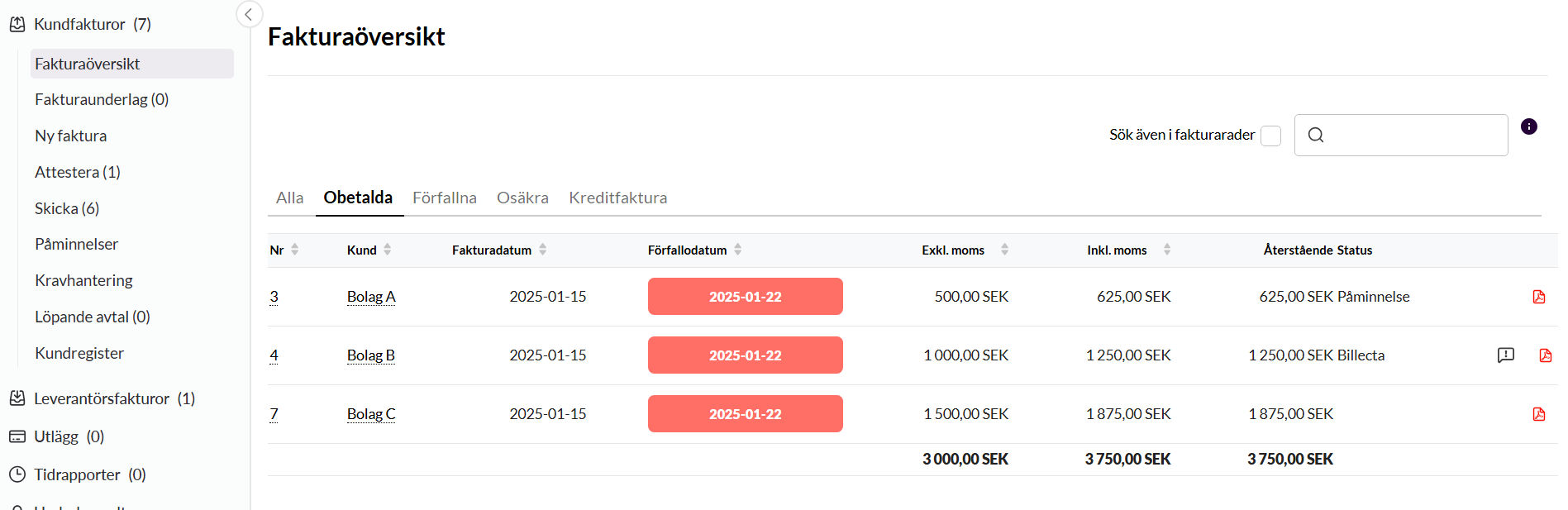
The invoice overview shows all customer invoices, and you get an indication of what remains unpaid and which amount remains. Here you can also see the status of whether a reminder has been sent through Kleer or whether the invoice has gone on to claims management through Billecta.
The search box above the list matches against customer name, invoice number and organisation number, whether the number is written with or without a hyphen.
The unpaid invoices are shown in both the filter unpaid and the filter due. The difference is that only unpaid and overdue invoices are shown under the filter due, while all unpaid invoices are shown under unpaid. This filter therefore also contains invoices you have sent today, for example. The invoices that are unpaid after the due date are marked in red.
Reminders
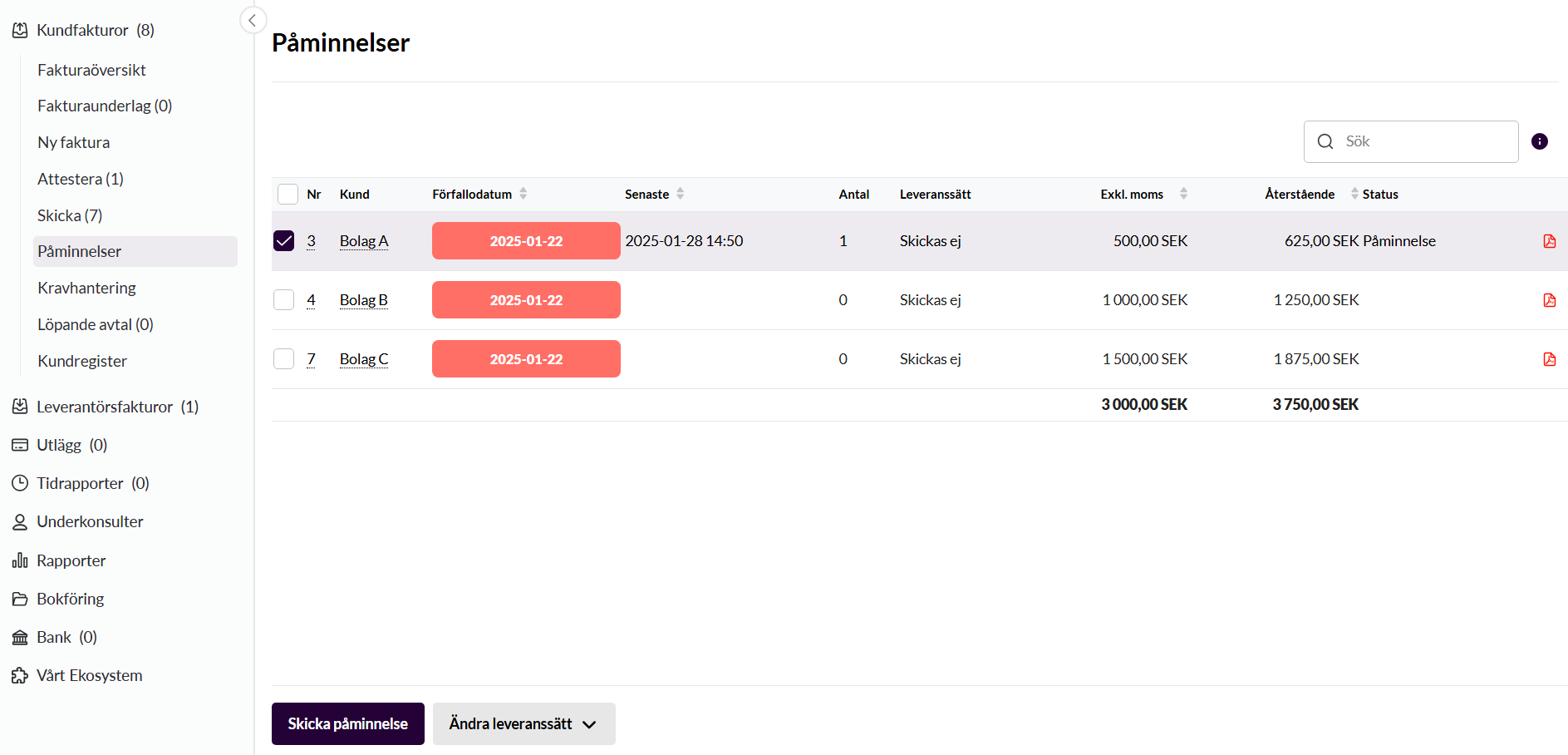
Here you only see overdue and unpaid invoices that you can choose to send reminders on or follow up the status of.
Claims management
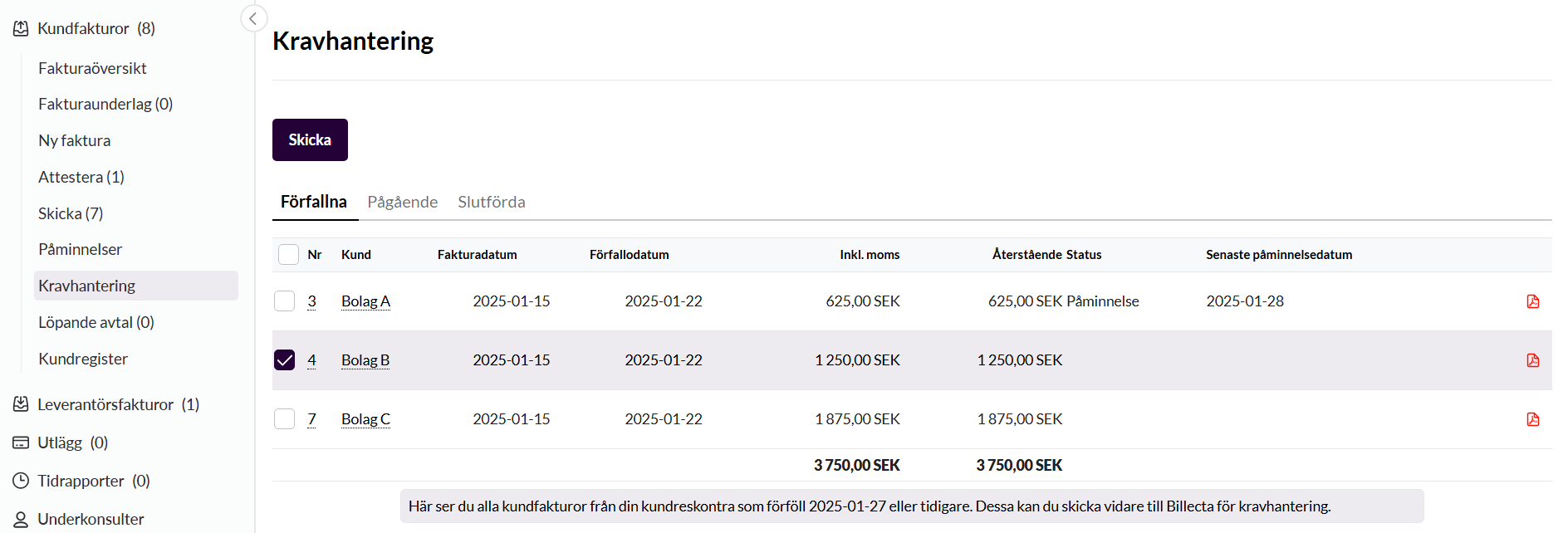
Here you handle manual claims management or review the status of the invoices you have passed on to Billecta. You can see which invoices are being handled and which cases are completed. You can read more about the handling through Billecta below.
What does the reminder that is sent from Kleer look like?
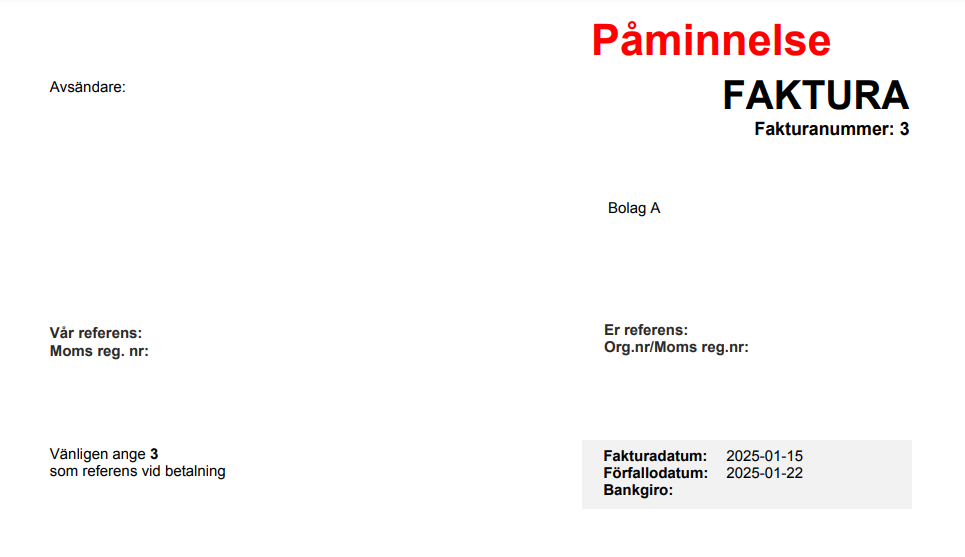
When you send a reminder from Kleer, a “copy” of the original invoice is sent, with “Reminder” in red on the invoice. The amount on the reminder will not take into account whether the customer has part paid the invoice. The whole amount that was on the original invoice is what you will remind about.
Your customer can see the amount that remains in their own finance system, however, and if it is not the same amount as the original invoice, they should send the part that actually remains.
If you know that this tends to go wrong, contact the customer and remind them of the remaining amount when the reminder is sent out. The remaining amount is shown in the column Remaining, which is visible in all the overviews in Kleer above.
Can you add a fee or interest to the reminder invoice from Kleer?
On the reminders that are sent through Kleer it is not possible to add either a reminder fee or late payment interest.
In that case you need to handle this manually, by creating a product for the reminder fee and a product for late payment interest. You then create an invoice manually and separately with these products.
However, we recommend that you use Billecta instead to collect your unpaid invoices, rather than the manual handling of reminder fees and late payment interest described above.
Do you send reminders and claims manually or automatically?
You can have automatic reminder and claims management in Kleer. This is controlled at company level. If you want to adjust something in the automatic handling, for example switch the function on or off completely, or adjust the days or amounts that trigger the reminder/claim, contact your Kleer consultant. The rules for when an automatic reminder/claim case is sent are based on the number of days the invoice has been overdue and how much of the invoice remains unpaid. The automatic handling can be switched off for specific customers or individual invoices.
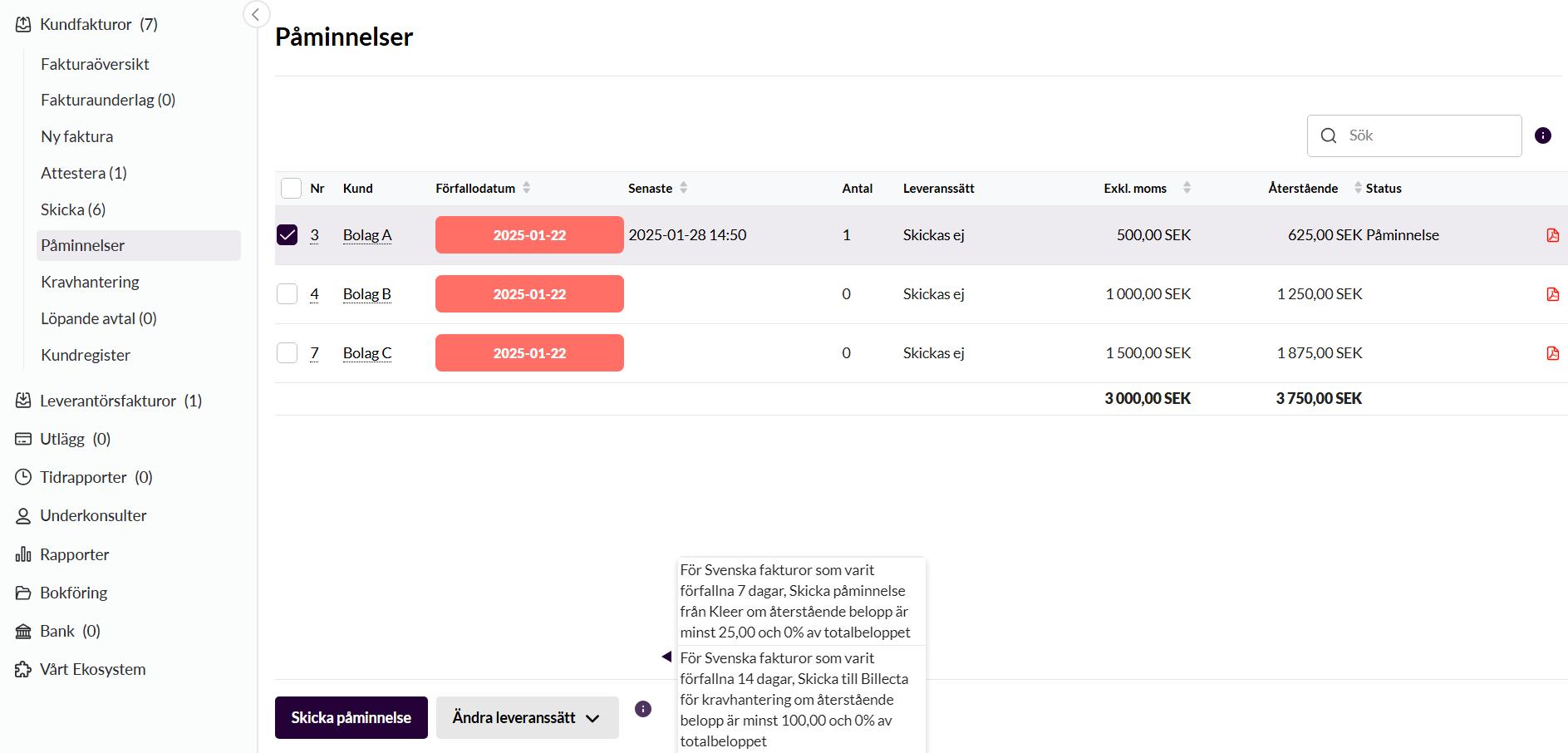
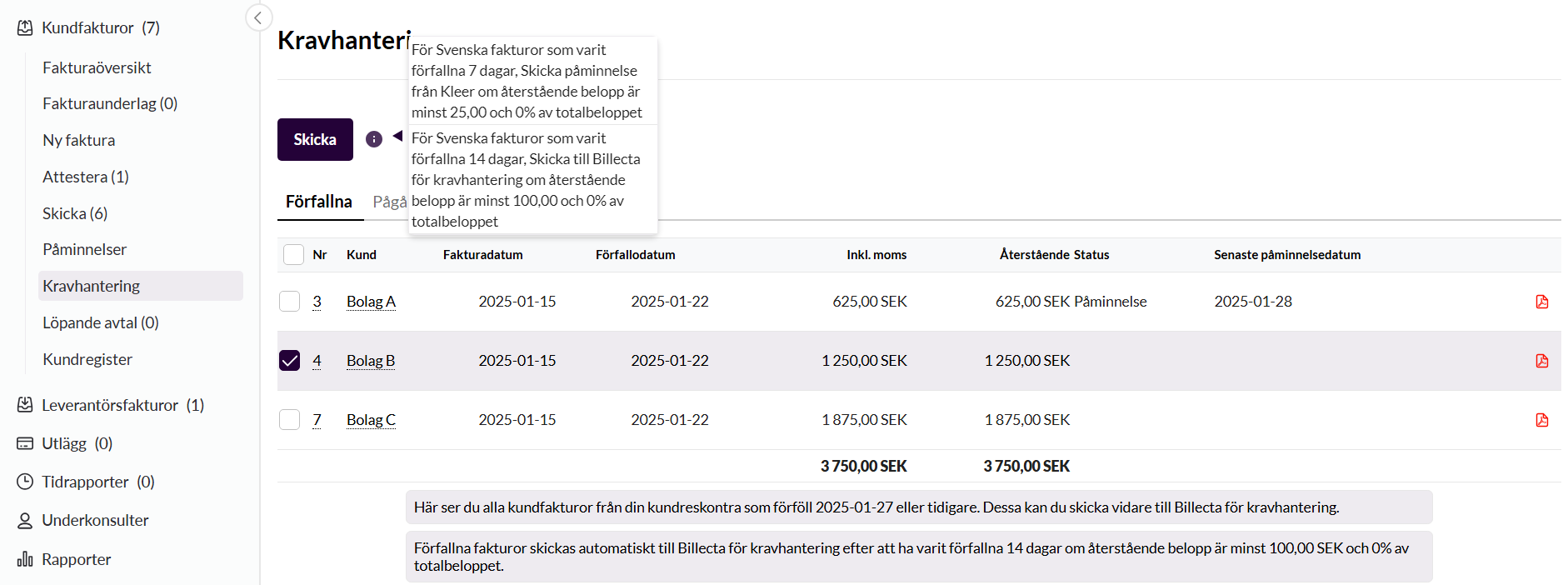

If you hold the mouse pointer over the information icon in the reminders or claims view, you see which rules you have set up in your company settings.
How do you switch off automatic reminder or claims management?
The rules for when something is to be sent automatically in the system need to be set by a Kleer consultant in the company’s settings. If you have automatic handling switched on, however, you can switch off the handling for a certain customer or for a certain invoice yourselves. You do it as follows.
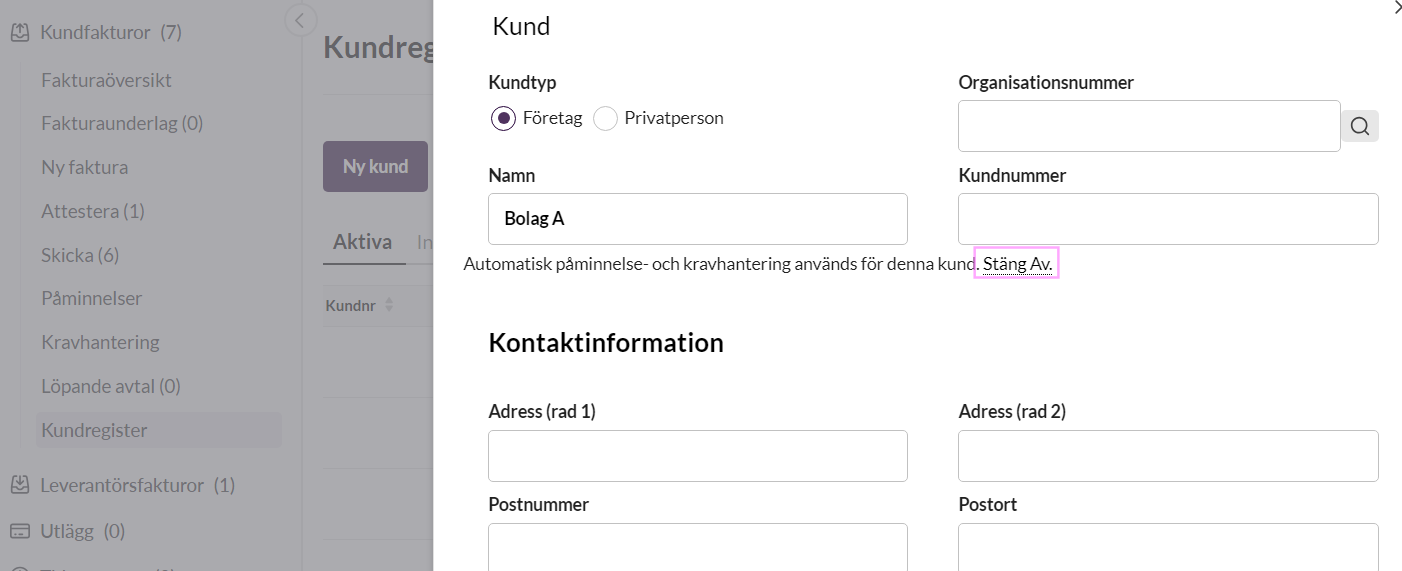
1. Switch off automatic reminder handling for a customer
This is controlled on the customer card, by clicking the customer and clicking the dashed line at the top where it says Switch off.
2. Switch off reminder handling on a customer invoice
This is controlled on the invoice itself, under the heading Automatic reminder and debt collection. There you also click Switch off.
Two different ways to send reminders manually
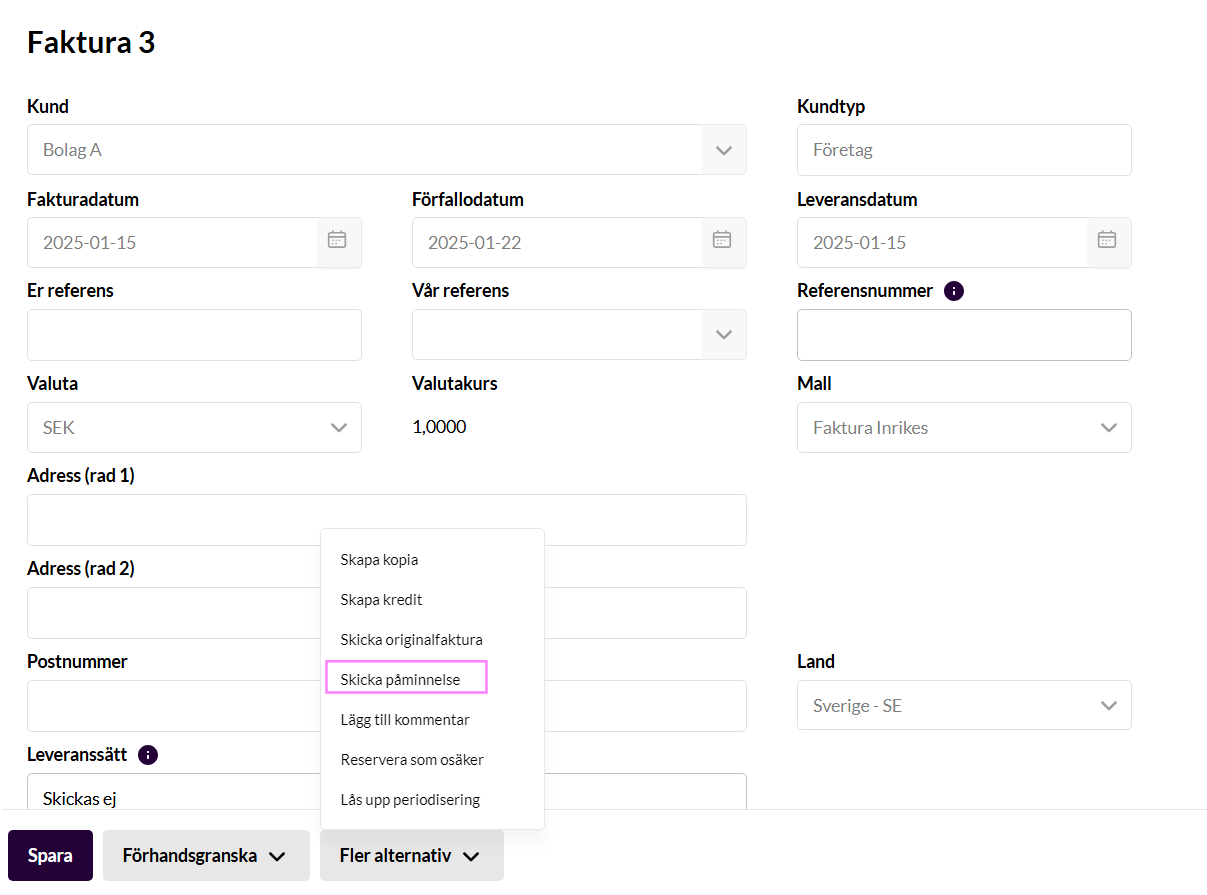
1. Send the reminder from the invoice itself
If you are on an invoice, you can click More options > Send reminder.
2. Send from the reminders tab
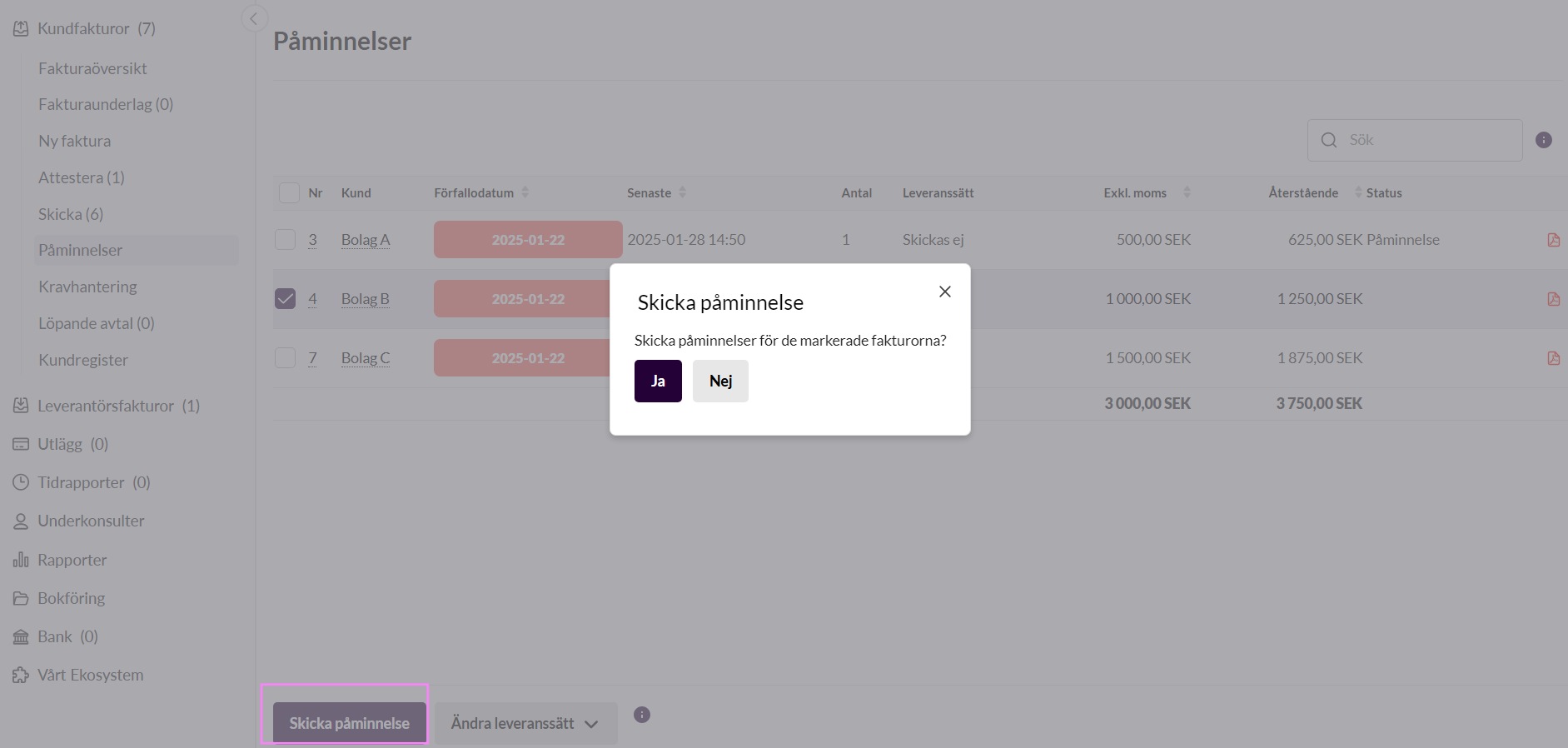
You go to the reminders tab and tick the invoice you want to send. Note: remember that the delivery method needs to be to an email or postal address for it to go to your customer. It is not possible to send reminders by e-invoice. In that case the delivery method needs to be changed before the reminder is sent.
In Kleer’s pricing model for customer invoices, one reminder by post is included. You can send more reminders for an invoice, but you then need to send the others with the delivery method email.
Claims management with Billecta
We have a cooperation with Billecta AB, who is our partner when it comes to debt collection and further claims management. With the help of the integration to Billecta, you can send invoices for collection with one click in Kleer. You find the handling under Customer invoices > Claims management. Do you not see the claims management heading as finance manager? Contact your Kleer consultant.
How does it work?
In the Kleer system
Nothing is activated until you send your first invoice for collection to Billecta. Under the claims management heading in Kleer you see the invoices that are overdue and that can be passed on to Billecta for handling.
The column Latest reminder date says whether a reminder invoice has been sent from Kleer and on which date. (So not whether a reminder from Billecta has been sent. The information only concerns reminders from the Kleer system.)
At Billecta
The first time a company in Kleer sends an invoice to Billecta, an account is created for them there. The account is then created for the user who is stated as the contact person for claims cases in Kleer. This is stated in your company settings in Kleer, which can only be adjusted by your Kleer consultant.
With this user you can create new user accounts in Billecta on your own, and thereby keep track of your claims. For extra users, however, there is an extra cost.
On the user account in Billecta you can choose the procedure yourself, that is what the process should look like from reminder to debt collection and so on. You can also handle requests concerning steps in the process and more.
Can you choose what is sent through Billecta?
When you send a case to Billecta for claims management, you can choose how the process is to be started. This is handled in the account you have received at Billecta and not through Kleer, where you can only choose to send the invoices to Billecta for handling, but nothing more about the procedure. In Billecta, however, you can decide whether the claims management process is to start with one or two reminders or directly with a debt collection claim. You cannot choose to send only reminders through Billecta.
What happens if the claim is not paid?
After an overdue debt collection claim, Billecta sends you a request about how you want to proceed with the case if everything is still unpaid.
If you do not answer the request, the case is passed on to long-term monitoring. This means that Billecta monitors the address and sends out new demand letters once a quarter. Besides constantly reminding your customer about payment, this prevents the receivable from becoming time-barred. The request is sent to the person at your company who is stated as the contact person for claims cases in Kleer.
You can choose to remove this request under settings in your account at Billecta. The case will then go on directly to the Swedish Enforcement Authority (Kronofogden) with an application for an order to pay.
What happens when the invoice is paid?
The customer who has received the claim can pay either directly to you or to Billecta.
Scenario 1: The amount is paid to you directly by the customer
If the customer pays directly to you instead of to Billecta, it works just as well. Billecta sees through the integration that the amount has been paid.
If the customer pays everything to you, including the fees for the claims management, Billecta will close the case at their end and invoice you for the fees.
Scenario 2: Your customer pays the claim to Billecta
If the whole sum is paid to Billecta, they pay the principal amount in to you the following day.
How do you cancel claims management?
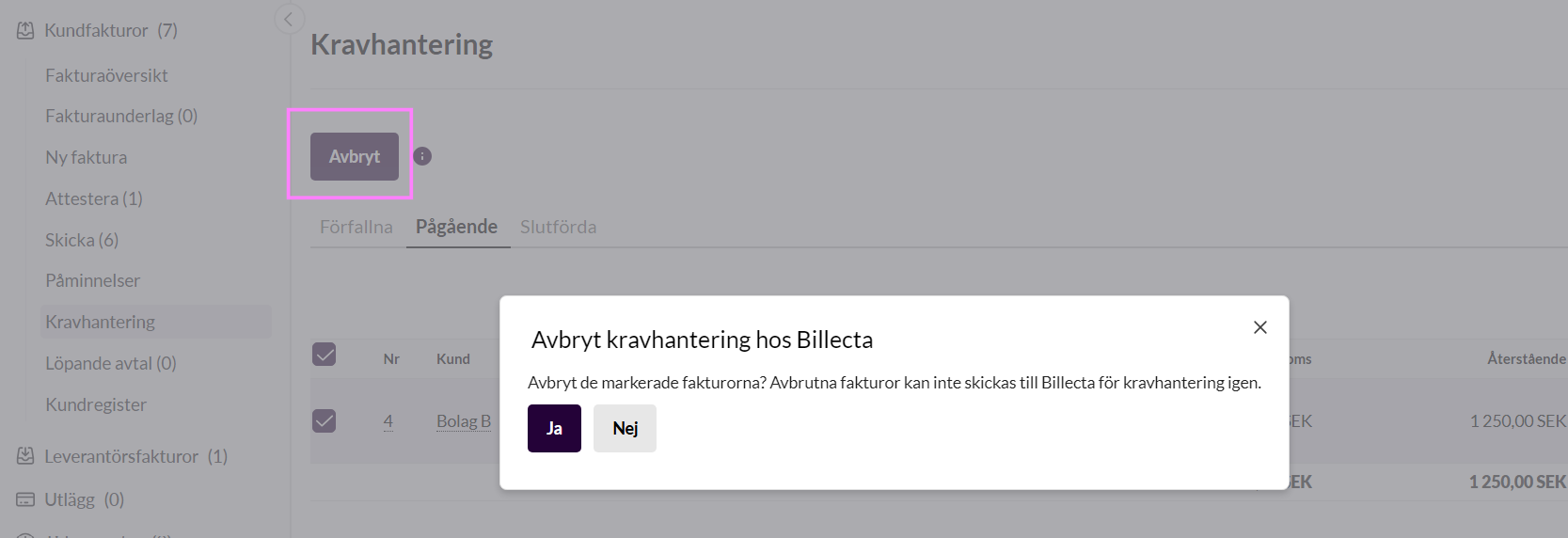
If you want to cancel a case, it is done directly from Kleer. If you choose to cancel an invoice that has been sent to Billecta for claims management, you are invoiced for accrued fees according to Billecta’s price list. Cancelling cases within 5 working days of the reminder being sent out is free, however.
Cases that have not been paid and have moved on to long-term monitoring are invoiced quarterly, starting 90 days from the due date of the original invoice. Otherwise the general terms apply. Read about them further down.
What does claims management with Billecta cost?
- No annual fee.
- Billecta AB keeps collected fees and accrued late payment interest, according to Billecta’s price list.
- VAT on collected debt collection costs is invoiced to you. This is not a cost, but is reported as input VAT.
Prices and fees
Billecta’s fees for reminders, debt collection claims and instalment plans change over time, and the fees to the Swedish Enforcement Authority are set by the authority, so the amounts are not stated here. You get the current price list from Billecta (krav@billecta.se) or through your consultant at Kleer. The Swedish Enforcement Authority’s fees are at kronofogden.se.
Claims management for international invoices?
For cases where the debtor is not registered in Sweden, Billecta charges an administrative fee. This is because Billecta has no possibility of collecting debt collection fees outside Sweden’s borders. Billecta sends a written demand to the debtor, and if this does not help, Billecta moves on and engages a local debt collection agent. You as a customer will always get the opportunity to accept the local debt collection agent’s fees before Billecta passes the case on.
Contact Billecta for more information and prices.
Contact details and general terms for Billecta
- The debt collection company is Billecta AB.
- Billecta AB is responsible for the receivable until it is paid.
- Billecta AB’s general terms apply in addition to this.
- Contact Billecta at krav@billecta.se.
Set up a smooth automatic flow in Kleer
When you set up an automatic flow, you can choose whether you only want to send reminders from Kleer, start claims management through Billecta, or a combination of these two.
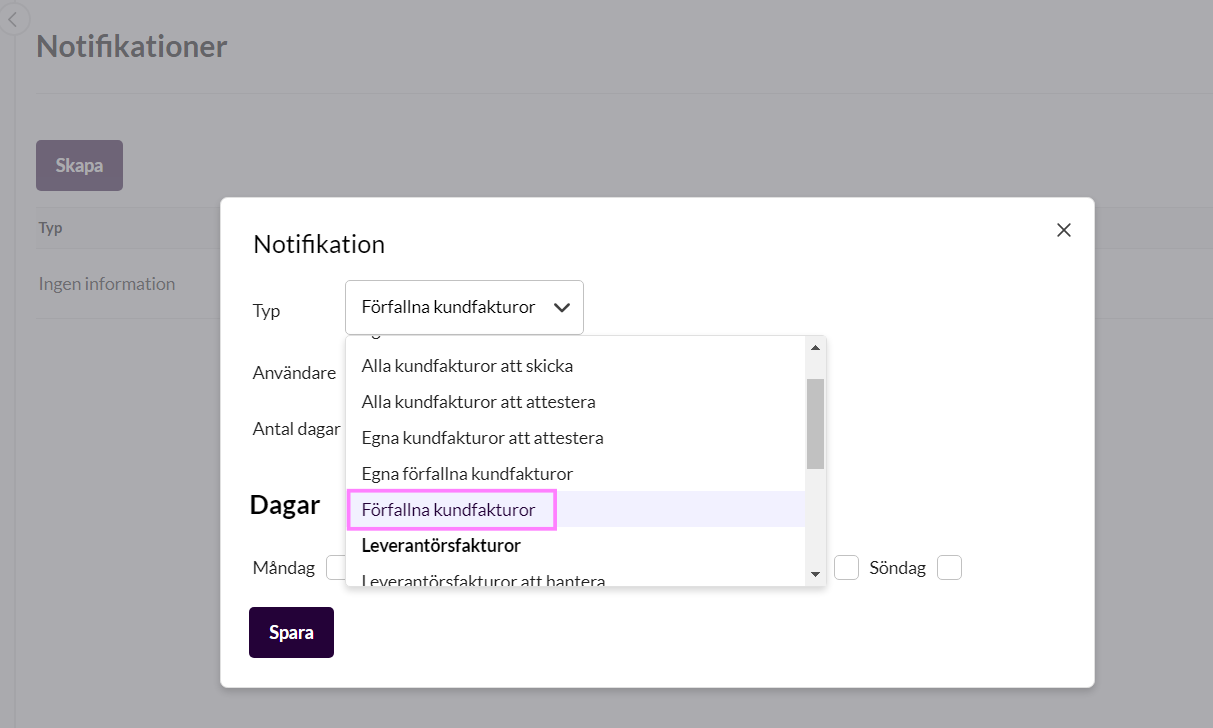
A tip, however, is to first have notifications about overdue invoices sent to someone at your company, so that you can review what is overdue. It could be, for example, an invoice where you have had a dispute or a dialogue on the side, which for some reason means that you do not want to send reminders on this particular invoice. You then have a chance to switch it off according to the instructions above before the automatic reminder handling starts.
Suggested automatic rules
- 4 days after the due date = Notification about the unpaid invoices in Kleer
- 7 days after the due date = Send reminder from Kleer
- 14 days after the due date = Send to Billecta for claims management
For steps two and three you need to ask your Kleer consultant for help setting them up, but you can control the notifications yourselves under Settings > Notifications.