

Secret employment contracts
How to make an employment contract and its payroll data (payroll runs, reports, accounting vouchers) invisible to users without permission for secret payroll.
Sometimes information about certain people’s salary can be sensitive, so that you want employment contracts and the related payroll data (for example payroll runs, data in reports and accounting vouchers) to be hidden from people without special permission.
You can solve this in Kleer by:
- Giving one or more users permission for secret payroll
- Then letting these people tick which employment contracts should be marked secret
Permissions for secret payroll
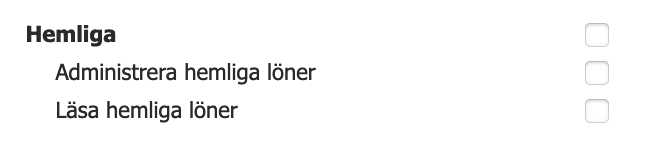
Under Settings > Users, click a user’s name. Under the Permissions tab there is a heading Secret with two payroll permissions:
- Administer secret payroll: gives the right to see and change secret employment contracts, payroll runs with secret salaries and so on
- Read secret payroll: gives read access only
Users who have the permission for secret payroll have access to the secret employees they have permission for. For example, a middle manager with the secret payroll permission can only see secret salaries for the people they are the manager of.
Checkbox on the employment contract
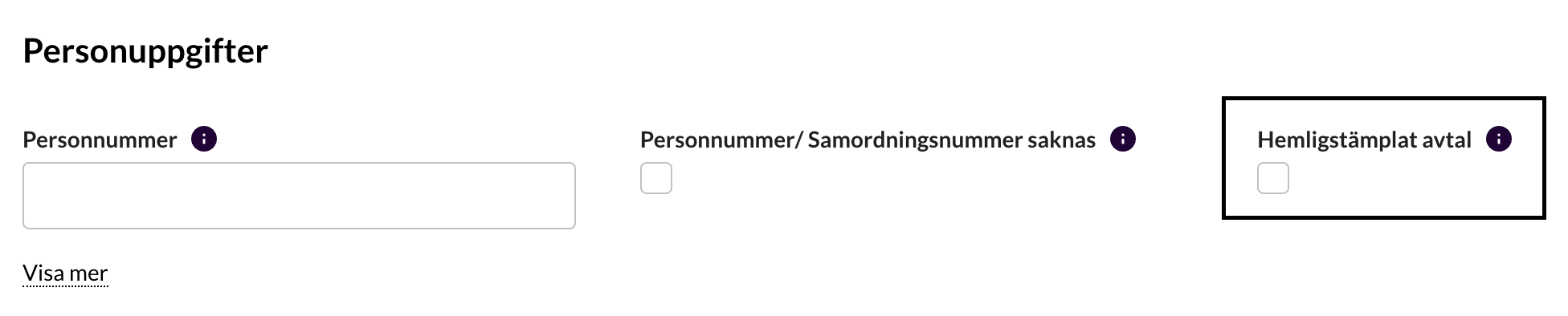
Under the General tab on the employment contract there is a checkbox Secret employment contract that controls whether the employment contract and the related payroll data are marked secret.
If the box is ticked, retroactive payroll data, payroll runs, vouchers and so on are marked secret immediately.
(If you later clear the box, the vouchers that were marked secret remain secret, but other data such as payroll runs and report data becomes available.)
Accounting vouchers

On the vouchers there are two additional checkboxes if the box “Secret voucher” is ticked, to state which permission, in addition to finance manager, is required to see the secret voucher.
For all salary vouchers (including accruals) the box “Administer all the payroll” is ticked automatically, and for people with secret salary “Including secret payroll” is also ticked automatically.
Normally you therefore never need to change these settings.
Pages and reports that are affected in the system
Below is a summary of the pages and reports that are affected.
Settings
- Users: A padlock is shown on people with secret contracts. People without permission for secret payroll cannot open the employment contract.
Payroll
- Payroll runs: Payroll runs that contain secret salaries are filtered out for people without permission. (A padlock is shown on these rows for people with permission for secret payroll.)
- Authorise: Secret salaries are filtered out for people without permission. (A padlock is shown on these rows for people with permission for secret payroll.) It is also not possible to create a payroll run that mixes secret and non-secret salaries, so you must authorise secret and non-secret salaries separately.
- Pay: Payroll runs that contain secret salaries are filtered out for people without permission. (A padlock is shown on these rows for people with permission for secret payroll.)
- Salary report: People with secret salaries are filtered out of the drop-down list where you choose a user, if you have access to others than yourself.
- Extra payroll run: People with secret salaries are filtered out of the drop-down list where you choose a user. It is not possible to create an extra payroll run that contains both secret and non-secret salaries.
- Statements of earnings and tax deductions: Secret salaries are filtered out for people without permission. (A padlock is shown on these rows for people with permission for secret payroll.)
Expenses
- Expenses journal: Links to vouchers and payroll runs that belong to people with secret salary cannot be clicked by people without permission.
Payroll reports
- Absence report: you cannot click the person’s name without the right permission
- Payroll report: secret data is filtered out
- Salary statistics (basis for K10): secret data is filtered out
- Variable compensation: secret data is filtered out
- Annual leave owed (holiday liabilities): secret data is filtered out
Tax returns
- Individual employer declaration: if there is at least one secret employment contract in the company, permission for secret payroll is required to see the report