

The consultant overview
Get an overview of how efficient the business is, based on the employees in the company. Here you can follow employment rate, utilisation rate, billing rate and invoicing rate at company level, but also at individual level.
An overview of how efficiently the consulting business performs in relation to reported working time. It helps you identify patterns, unused time and opportunities for improvement.
Information
The purpose of this view is to give the management team a clear overview of how efficiently the consulting business is run. The analysis is done at several levels, company level, project level and individual level, to make both strategic and operational insight possible.
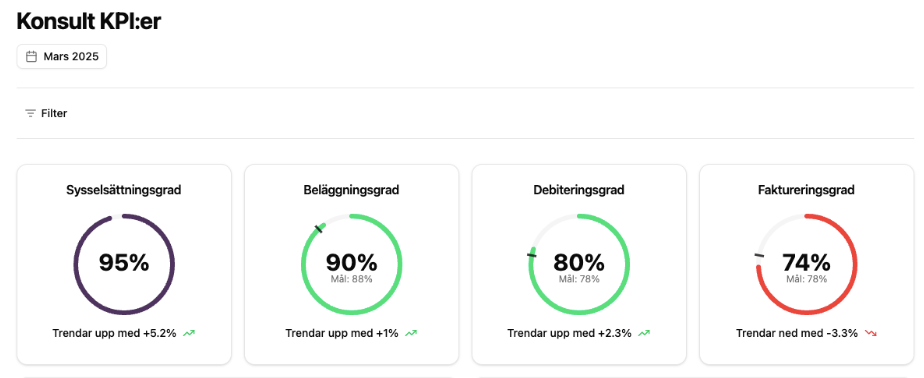
The dashboard visualises key figures such as:
- Employment rate: How large a share of the available working time is used.
- Utilisation rate: The share of working time that is planned for customer assignments.
- Billing rate: The share of working time that is actually charged to the customer.
- Invoicing rate: The share of chargeable time that is turned into actual invoices.
Filtering of categories
Choose categories to filter on for a deeper analysis
You can choose which categories are shown or hidden in the filter button. This makes it possible to include categories that are relevant for analysis or follow-up, and thereby look at parts of the business in isolation.
Default settings:
- All project module specific filters are activated by default.
- All categories that have been configured under Settings > Users are available in the filters.
Filter options:
The company can filter on:
- Compare against the previous period or the same period the previous year.
- Project module specific categories, such as project type, business area or responsible consultant.
- User categories, for example team membership, role or other user-specific metadata.
Under Settings > KPIs the company chooses which definition of billing rate (DG) and utilisation rate (BG) is to apply. In this way the measures can be adapted to what best reflects the needs and ways of working of the business. The choice applies in Insights and also in the report Key figures for time, in the utilisation rate column in Time records > Registered time, and in the home page widgets Key figures per month and Key figures accumulated. There the definition is written out, for example Billing rate (DG1) or Utilisation rate (BG1).
Billing rate (DG)
Measures how large a share of the time is spent on chargeable activities in customer projects. There are four options to choose from:
- DG1: Authorised time on chargeable activities in customer projects / (Scheduled time minus Absence).
- DG2: Authorised time on chargeable activities in customer projects / Scheduled time.
- DG3: Authorised time on chargeable activities in customer projects / (Reported time minus Absence).
- DG4: Authorised time on chargeable activities in customer projects / Reported time.
Utilisation rate (BG)
Measures how large a share of the time is actively planned or used in customer projects. There are four options:
- BG1: Time in customer projects / (Scheduled time minus Absence).
- BG2: Time in customer projects / Scheduled time.
- BG3: (Time in customer projects + internal projects) / (Scheduled time minus Absence).
- BG4: (Time in customer projects + internal projects) / Scheduled time.
If the company has not chosen anything, BG1 and DG1 are used.
Definitions and delimitations for key figures
The following terms are used in the dashboard to measure efficiency, resource use and financial outcome in the consulting business.
Employment rate
Definition: The theoretically available working time for a full-time employee during a given period (100% employment), provided that the person is employed for the whole period. Any part-time agreements (for example 80% or 50% service) are disregarded, as the assumption is that everyone is to be employed at 100%.
Clarification:
- Part-time employments (agreements below 100%) are not taken into account.
- Employments that start or end during the period: these are calculated proportionally, based on the actual employment time within the period for a full-time employee.
Which employees are included in the report?
- Only employees with an active employment contract in the company in question.
- People with an ongoing employment or an end date count as active.
- Only people with the role ‘time reporting = project’ are included. Administrative staff and other roles without this setting are excluded.
- Users without an employment contract (for example auditors or external users) are not included.
Users without a schedule When a period is closed, actual worked time can be calculated based on reported hours, since you cannot know the outcome in advance. This means there is a delay until the period has passed.
Group projects
Only employees in the company in question are included in the reports. Project members from other companies in the group are excluded, but can be followed up separately in each company.
Utilisation rate
Definition: The share of the scheduled time that is used in customer projects.
“The key figure can give values above 100% when there is overtime work.”
Billing rate
Definition: The share of working time that is spent on chargeable activities in customer projects. What counts as working time depends on which definition the company has chosen, DG1 to DG4.
Invoicing rate
Definition: The time that actually entitles you to invoice, based on completed work that has been invoiced during the period.
Scheduled time
Definition: The time that is planned for work according to the employee’s employment contract during the period in question. It refers to the expected working time for each individual, based on their employment rate (for example full time or part time) and actual employment interval.
Time in customer projects
Definition: Time that employees have registered on customer related projects during the specified period. This time can be both chargeable and non-chargeable, depending on the project’s settings. The basic premise, however, is that there is a customer and a sum.
Time in internal projects
Definition: Time that employees have registered on internal projects, such as sales, internal meetings or skills development, during the specified period. There is no customer and no price.
Absence
Definition: Time when the employee has been absent because of, for example, vacation, sickness, parental leave or another type of approved absence according to the company’s policy.
Unreported time
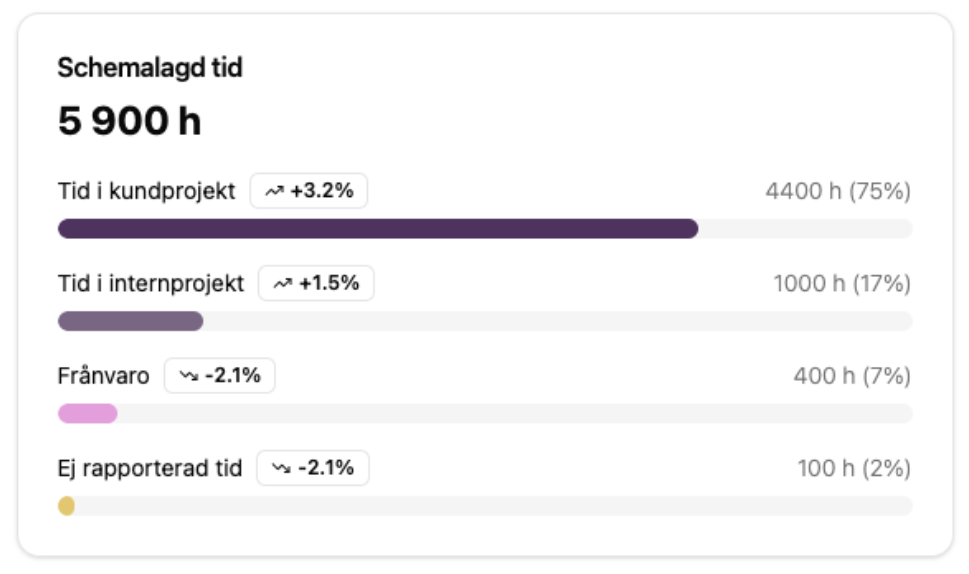
Definition: Time that has not yet been reported by the employee, even though work was expected according to the schedule during the period. It can indicate inadequate time reporting or deviations from planned work.
Time in customer projects
Time that employees have registered on projects that have a customer, during the specified period. Absence is not counted.
All four measures in this section count only authorised time.
Chargeable time
The part of the time in customer projects that is on an activity that can be invoiced to the customer.
Invoiced to customer
Time that is on a customer invoice that has been posted. Fixed price projects are not included in this measure.
Non-chargeable time
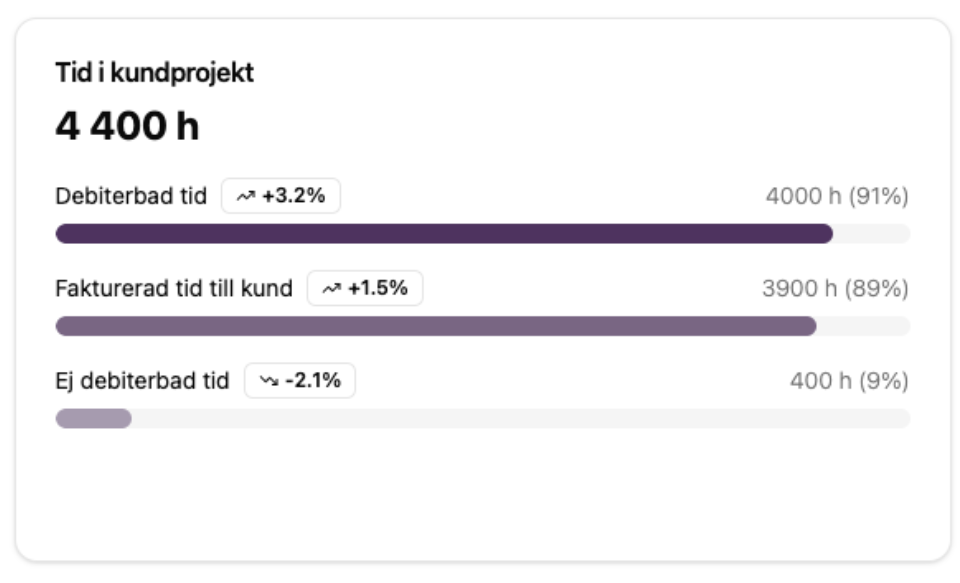
The rest of the time in customer projects, that is the time that is not on a chargeable activity. The measure is time in customer projects minus chargeable time.
FAQ
Can you set targets at individual level?
No, at the moment it is not possible to set individual targets, which can otherwise be relevant when an employee is expected to work a certain amount of time on internal projects.
Why is no data, or little data, shown in the dashboard, even though we have consultants who work against customers?
It is probably because the project module and time reporting are not activated or used. For the dashboard to be able to show utilisation and invoicing, the consultants need to register time against projects and customers.
We recommend that you contact your consulting team to activate the function, or if you think that information is missing.